How Sentinel fits into your environment.

The diagram below shows the complete flow from a user reporting a suspicious email to the structured analysis being returned.
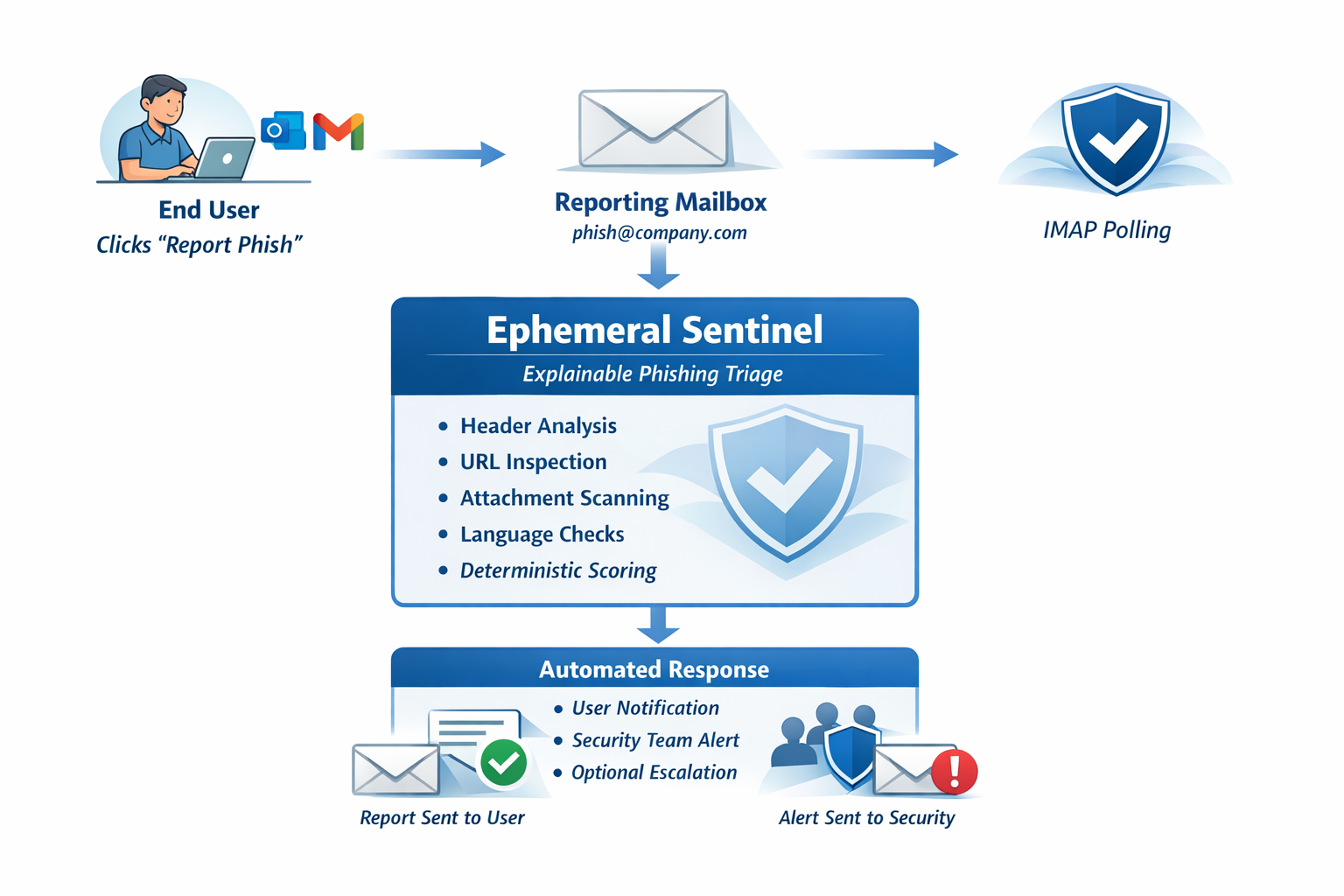
Ephemeral Sentinel architecture diagram: user reports email via Report Phish, email forwarded to reporting mailbox, Sentinel polls via IMAP, analysis performed locally, report returned to user and security team

Step by step.

Every phishing report follows the same path — from the employee's inbox to a structured analysis returned automatically.

1
User clicks Report Phish
Available in Outlook (via the native Report Message add-in or a custom button), Gmail, or any email client configured to forward suspicious emails. The original message is attached as a .eml file.
2
Email arrives in reporting mailbox
The forwarded message lands in a dedicated reporting mailbox — typically something like phishing@yourdomain.com. This is a standard mailbox that already exists in most environments using a phishing report button. No new mailbox infrastructure required.
3
Sentinel retrieves the message
Ephemeral Sentinel connects to the reporting mailbox on a configurable polling interval via Microsoft 365 Graph API, Gmail API, or IMAP — whichever matches the client's mail environment. All integrations are outbound-only. No inbound ports are required.
4
Analysis engine inspects the message
The attached .eml is parsed and loaded into memory. The deterministic analysis engine evaluates: email headers and routing path, SPF / DKIM / DMARC authentication results, sender domain characteristics, phishing language indicators, embedded URLs, and attachment file types. All analysis is local — no content leaves the environment.
5
Structured report generated
Analysis produces a weighted risk score (Benign / Suspicious / Malicious), a list of detected signals, an attack type classification, a plain-language attack narrative, and a recommended action.
6
Report returned, email content discarded
The structured report is sent back to the user who reported the email and optionally copied to the security team. The original email content is discarded from memory. It is never written to disk and never retained. Report metadata (timestamp, risk score, detected signals) is logged to a local database for audit purposes.

Every decision was made with security in mind.

Ephemeral Sentinel was designed to be a low-risk addition to any environment. These principles guided every architectural choice.

🚫
No Inbound Ports
Sentinel initiates all connections outbound. Nothing reaches in from the network. There is no listening port to expose, no service to scan, and no inbound attack surface to defend.
📡
Outbound Polling Model
The polling model requires only standard IMAP/API access to a single mailbox. This is trivially compatible with every enterprise firewall and mail server configuration. No webhooks. No inbound API endpoints.
💨
Ephemeral Processing
Email content exists in memory only for the duration of the analysis. Once the report is generated, the message is released from memory. Nothing is written to a file, database, or log. Only report metadata is persisted.
🏠
No External API Calls
Analysis is entirely self-contained. No reputation lookups, no cloud-based detonation, no third-party enrichment services. Email content stays inside the environment at all times.
🤖
No AI Dependencies
The analysis engine uses deterministic rule-based logic. No large language models. No inference APIs. No training data requirements. Results are consistent, reproducible, and explainable without probabilistic reasoning.
📦
Flexible Deployment
Runs on any machine with internet access — home server, VPS, or cloud VM. Docker available for containerized deployments. No specialist infrastructure required.

What you're deploying.

Sentinel is designed to be lightweight and easy to understand. No complex dependencies. No black boxes.

Component Details
Deployment Runs on any machine with internet access — home server, VPS, or cloud VM. Docker available.
Mailbox Connectivity Microsoft 365 Graph API, Gmail API, or IMAP (port 993 / TLS). All outbound-only.
Inbound Ports None required.
Analysis Engine Deterministic rule-based. No ML model. No AI API.
Email Retention None. Email content processed in memory and discarded.
Persistence SQLite / PostgreSQL — report metadata and hashed IOC records only. No email content.
IOC Store Per-tenant HMAC-SHA256 hashed indicators. 90-day retention. Raw values never stored.
Licensing Offline Ed25519 signed license. Validated at startup — no runtime cloud check.
External Calls None. All analysis is local.
Report Delivery Email reply to reporting user. Optional CC to security team address.
Analysis Coverage Headers, SPF/DKIM/DMARC, domain signals, language patterns, URLs, attachments, IOC extraction.
Risk Output Benign / Suspicious / Malicious — with weighted signal scoring and Recommended Blocks.

What Sentinel inspects.

Nine analysis modules run against every reported email. Each contributes to the final risk score and report.

📨
Header Analysis
Parses the full email header chain to trace the true routing path from origin to inbox. Identifies relay anomalies and header manipulation.
🔐
Authentication Signals
Evaluates SPF, DKIM, and DMARC results. Pass/fail/neutral status for each protocol, with plain-language explanation of what each result means.
🌐
Domain Evaluation
Assesses sender domain age, registration pattern, top-level domain abuse reputation, and indicators of machine-generated naming schemes.
🗣️
Phishing Language Detection
Identifies urgency signals, impersonation markers, financial triggers, and social engineering patterns in the email body.
🔗
URL Inspection
Analyzes embedded links for redirect chains, mismatched display text, suspicious URL structure, and patterns associated with phishing infrastructure.
📎
Attachment Evaluation
Flags suspicious file types, unusual encoding patterns, and attachment characteristics associated with malware delivery campaigns.
📊
Deterministic Risk Scoring
Weighted scoring across all signal categories produces a clear risk verdict: Benign, Suspicious, or Malicious. Score is transparent and auditable.
📝
Attack Narrative
Plain-language description of the detected attack technique — written to be understood by users without a security background.
🛡️
IOC Extraction
Sending IP, sender domain, suspicious URLs, and attachment SHA-256 hashes extracted from every verdict above the risk threshold. Surfaced as "Recommended Blocks" and stored in a hashed per-tenant database.

Connect to any mailbox.

Sentinel supports three mailbox integration modes. Choose the one that matches each client environment — or configure different modes per client.

Integration Best For Authentication Notes
IMAP Self-hosted mail, legacy environments Username / App password Universal — works with any IMAP-capable mail server
Microsoft 365 Graph API M365 / Exchange Online tenants OAuth 2.0 (client credentials) No legacy auth required. Recommended for modern M365 deployments.
Gmail API Google Workspace tenants OAuth 2.0 / Service Account Native Google Workspace integration. No IMAP app passwords needed.

No mail flow changes. Connect in minutes.

Choose a plan and connect your reporting mailbox. No mail flow changes. No complex configuration. See the output for yourself.

Questions about deployment, integration, or fit for your environment? Get in touch.

Get in Touch