Forward suspicious emails. Get a clear answer.

Most phishing reports
go unanswered.

Your users stop reporting because of it.

Every phishing email looks real to someone. Sometimes that someone is you.

Reported emails sit in queues, get skipped, or never receive a response. Your users click Report Phish and hear nothing back. After enough silence, they stop reporting entirely. Ephemeral Sentinel closes that loop—every reported email analyzed automatically, every reporter answered, no analyst required for routine triage.

from $29/mo · no setup · cancel anytime

Try it. If it's wrong, you don't pay.

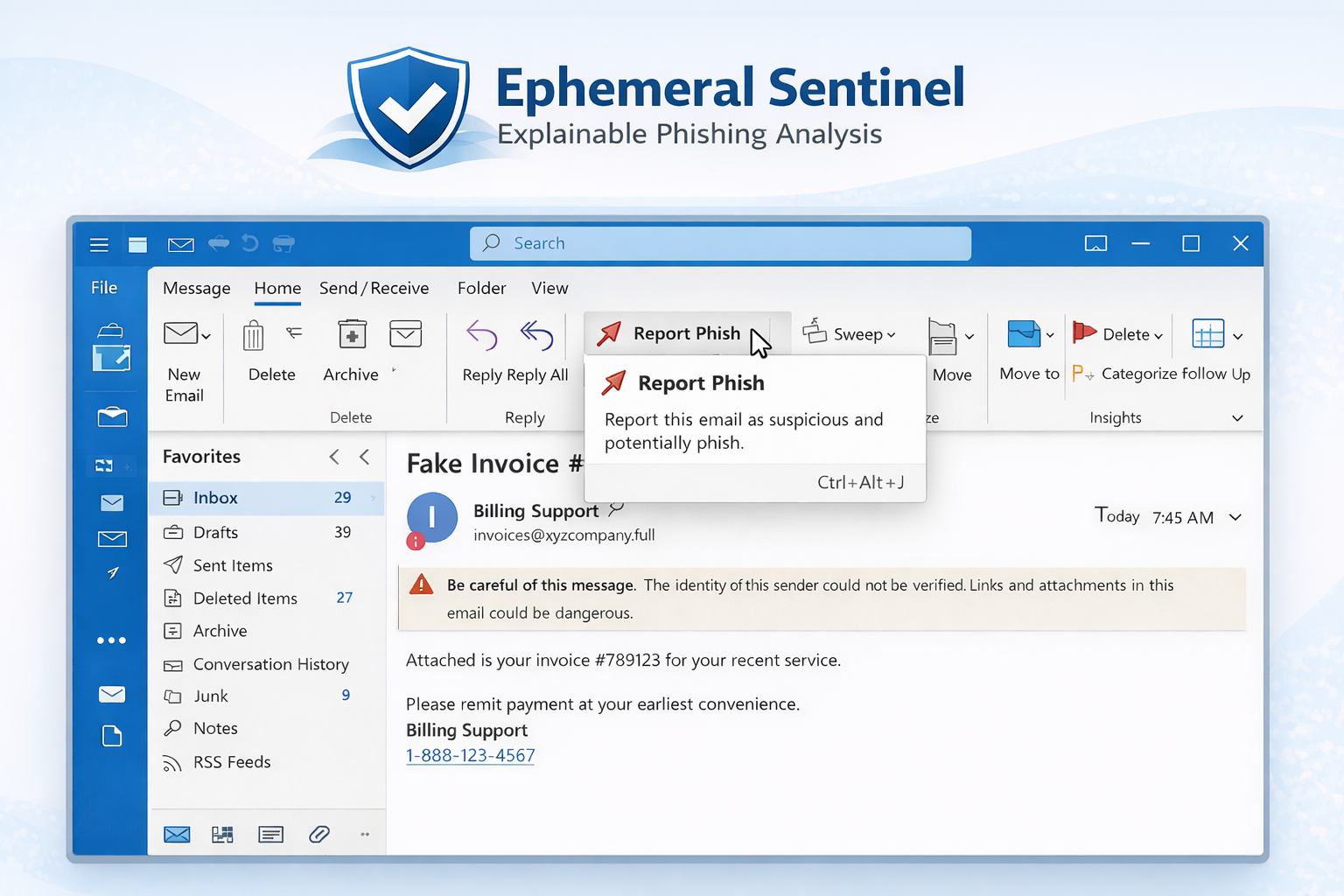
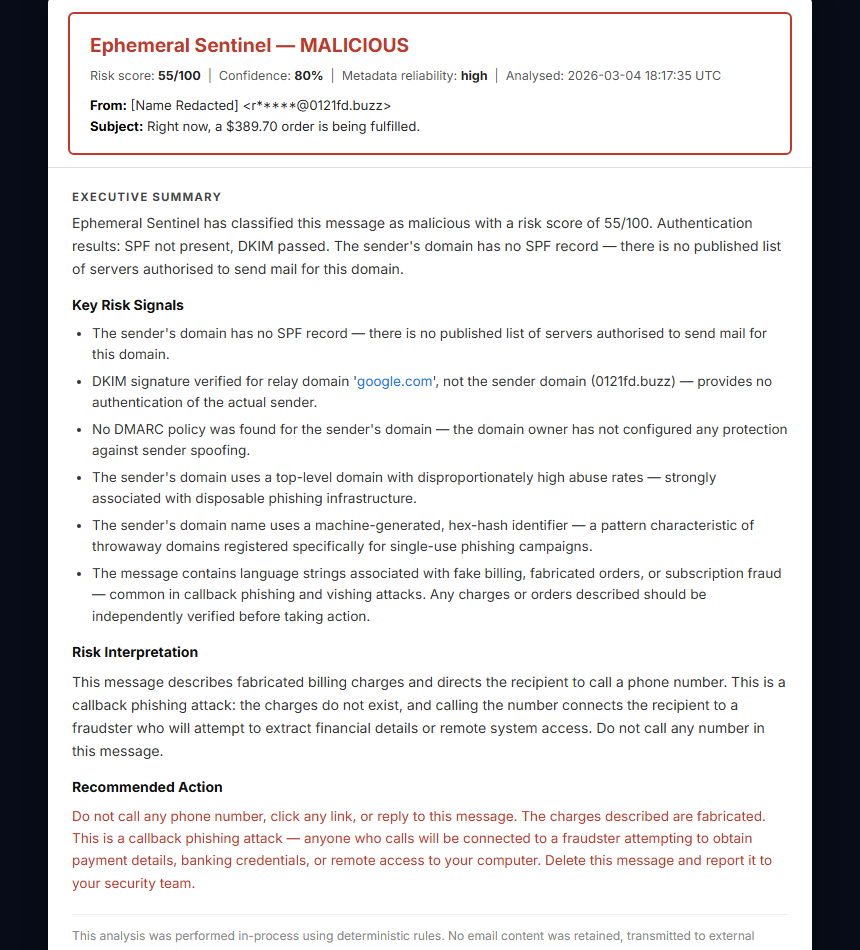
Example phishing email as it appears in Outlook before being reported Ephemeral Sentinel analysis report showing Malicious verdict with key risk signals

Stop doing this. Start getting answers.

🤷
Guessing
The email looks plausible. You're not sure. You delete it or ignore it. You never find out if it was real.
📨
Asking IT
You forward it and wait. The queue is full. Three days pass. You still don't know. The attacker counted on exactly this.
🖱️
Risky clicking
You open the link to see what it is. That's what they wanted. Credential harvesting starts the moment you land on the page.

This is what your users receive.

██████@█████████.com
Your ███████ account needs immediate attention
MALICIOUS
Risk 55/100 Confidence 80%
This email is a credential phishing attempt. The sender domain is newly registered and fails all email authentication checks. The message uses urgency language designed to compel the recipient to click a link to a fraudulent login page.
  • Sender domain registered 6 days ago — consistent with disposable phishing infrastructure
  • SPF FAIL / DKIM missing / DMARC FAIL — all authentication checks failed
  • Reply-To address mismatch — responses redirected to attacker-controlled address
  • Urgency language detected — “account suspended”, “verify immediately”
  • Link domain has no legitimate business presence; hosted on high-abuse TLD
Do not click any links. Mark as phishing and delete. If you clicked a link and entered credentials, change your password immediately and notify your security team.
Copied — ready to forward Link copied!

This is what your users receive — automatically, within seconds of reporting. View Full Example Report →

Most phishing reports disappear.

The problem is structural, not motivational. Organizations don't fail to respond to phishing reports because they don't care—they fail because manual review at scale doesn't work.

Organizations invest in phishing reporting tools. Users are encouraged to click Report Phish when something looks suspicious. Dedicated mailboxes get set up.

Then the reports pile up. Security teams don't have time to review every forwarded email. Users hear nothing back. After a few rounds of silence, they stop reporting entirely.

The feedback loop breaks. Security awareness degrades. Threats go unexamined.

📭
Reports go unread
Reporting mailboxes fill with no one reviewing them
🔕
No feedback to users
Users never hear if their report mattered
📉
Reporting drops off
Users stop reporting after repeated silence
🎯
Threats go undetected
Active campaigns spread before teams notice

The scale of the problem is documented.

These aren’t edge cases. This is the baseline your team is working against.

📊
298,878
Phishing complaints filed with the FBI in 2023 — the #1 reported cybercrime category for the fifth year running.
FBI IC3 2023 Annual Report
21 seconds
Median time for a user to click a phishing link after receiving it. The triage queue doesn’t move that fast.
Verizon DBIR 2024
🎯
84%
Of organizations experienced at least one successful phishing attack in 2023. Most had a reporting process. The gap wasn’t awareness — it was response time.
Proofpoint State of the Phish 2024

You had the report. You just didn't have time.

And attackers count on that delay.

Monday
A user reports a suspicious email. Forty other reports are in the queue. This one waits.
Tuesday
Still in the queue. No capacity to review.
Thursday
Your SIEM fires. Active credential harvesting campaign. Same sender domain. Same subject pattern. Three employees already clicked.
The report was real. It sat in your queue for 72 hours.

This isn't a failure of process — it's what happens when manual triage meets email volume.

What happens without a response process

Ephemeral Sentinel closes that loop.

Every reported email gets a response. Nothing sits unanswered. No backlog of unreviewed reports.

You stay in control — this handles the repetitive first pass.

Instant Delivery
Reports are returned to the reporting user and optionally copied to the security team — within seconds of analysis completing.
📋
Structured Reports
Each analysis produces a clear report explaining detected signals, attack technique, risk score, and recommended action.
🔒
Privacy-First Design
Email content is processed ephemerally in memory. Nothing is retained, and no content leaves your environment.
🔍
Deterministic Analysis
Headers, authentication signals, domain characteristics, phishing language, URLs, and attachments — all inspected using deterministic rules. We don't guess. We explain.
🛡️
IOC Extraction
Sending IPs, sender domains, suspicious URLs, and attachment SHA-256 hashes are automatically extracted from every verdict above the risk threshold and surfaced as ready-to-block indicators in the report.
🤖
No AI Dependency
Analysis is fully rule-based and deterministic. Every finding is traceable to a specific rule — no model, no inference, no black box. Results are consistent and auditable across every analysis.

What happens when an email is submitted

Suspicious results can be escalated — this handles the routine, not the edge cases.

Anything unclear or suspicious can still be reviewed manually.

For teams that don't have time to investigate every reported email.

Whether you're an IT team managing your own environment or an MSP covering multiple clients — every report gets analyzed automatically. Your team stays focused on the ones that actually need you.

Managed Service Providers

Automate triage for every client.

Deploy Sentinel inside each client environment. Every reported email receives automated analysis. Your analysts focus on real threats, not manual triage.

  • Deploy once across all clients — every reported email analyzed automatically
  • Deliver immediate feedback to end users
  • White-label branding — your logo, your reports (Pro & Enterprise)
  • MSP dashboard with verdict trends and high-risk event visibility
  • IOC extraction and per-tenant hashed threat intelligence store
Learn More for MSPs
Organizations & Businesses

Give employees answers when they report.

Every phishing report becomes a learning moment. Employees receive plain-language explanations. Security teams receive structured triage automatically.

  • Every employee who reports receives an automatic analysis response
  • Reinforce security awareness training naturally
  • Security team receives structured triage reports
  • Surface active campaigns before they spread
Learn More for Businesses

What changes when the queue disappears.

Without Sentinel
  • Reports pile up unreviewed — queue never clears
  • Users hear nothing back and stop reporting entirely
  • Analysts pulled into manual triage instead of real incidents
  • Inconsistent verdicts under time pressure
  • Active campaigns spread before the queue gets touched
With Sentinel
  • Every report analyzed automatically within seconds
  • Every reporter gets a plain-language answer, every time
  • Analysts see structured triage — not raw forwarded email
  • Consistent verdicts — same rules, every report, no variance
  • Campaign patterns surface automatically before they spread

Defender closes threats.
Sentinel closes the loop.

Microsoft Defender, Google Workspace security, and your email gateway are excellent at blocking threats before they reach users. That's their job, and they do it well. But when an employee clicks Report Phish on something suspicious, those tools don't respond to that user. There's no explanation, no feedback, no acknowledgment that the report mattered.

Ephemeral Sentinel was built for exactly that gap. It doesn't compete with your existing security stack — it closes the one loop those tools leave open: answering the person who did the right thing.

Simple integration with infrastructure you already have.

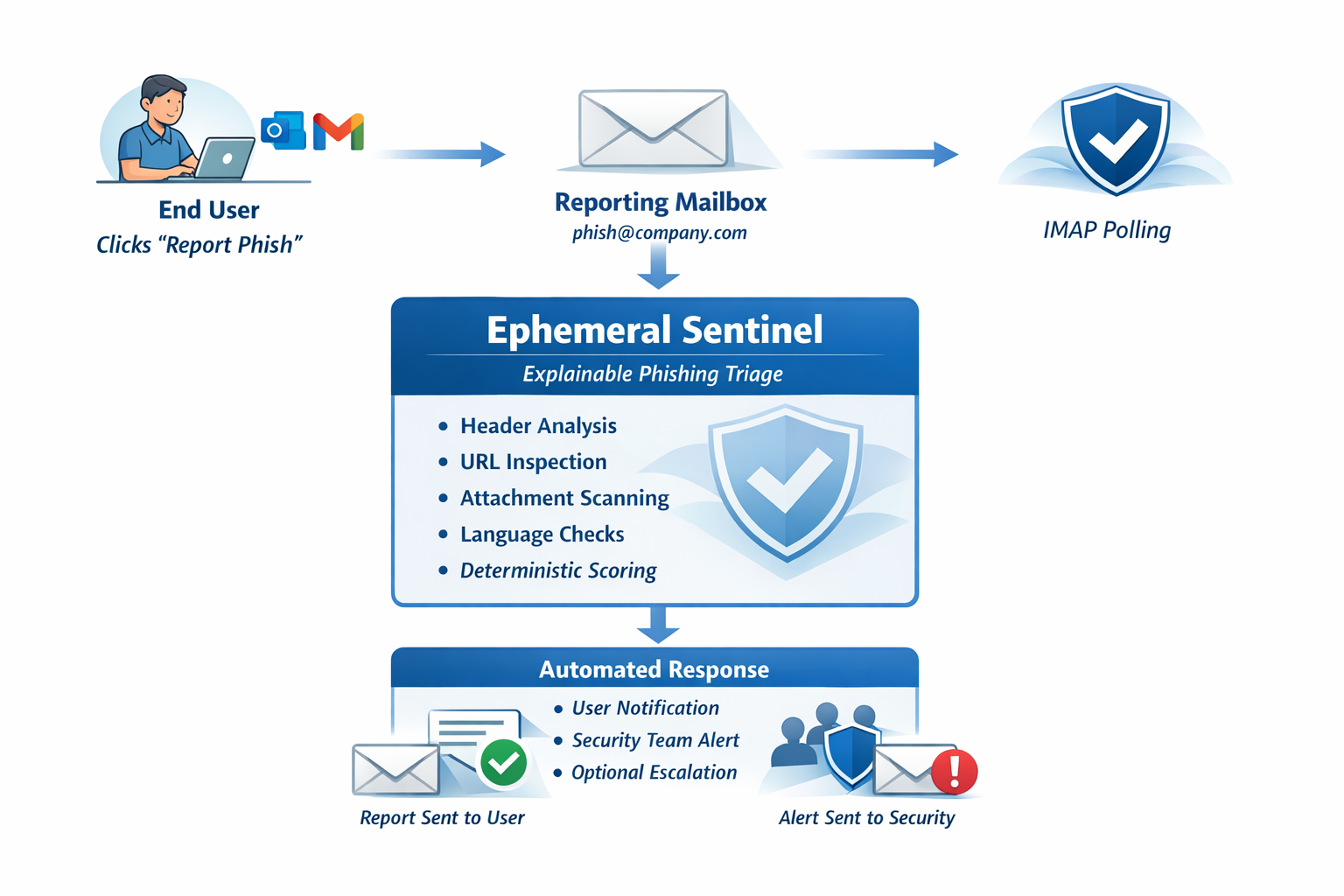
Sentinel connects to the reporting mailbox your Report Phish button already forwards to. Nothing else changes.

1
User clicks Report Phish
Available in Outlook, Gmail, or any email client with a phishing report button.
2
Email forwarded as .eml attachment
The original message arrives in your designated reporting mailbox.
3
Sentinel retrieves the message
Via Microsoft 365 Graph API, Gmail API, or IMAP. Outbound-only — no inbound ports required.
4
Deterministic analysis performed
Headers, auth signals, domains, language, URLs, and attachments inspected.
5
Structured report generated
Risk score, detected signals, attack narrative, and recommended action.
6
Report returned to user and security team
Users receive a plain-language explanation. Security teams get the technical detail.
Ephemeral Sentinel architecture diagram showing email flow from Report Phish button through analysis engine to report delivery

Built to run quietly and safely inside your environment.

Every architectural decision in Ephemeral Sentinel was made to minimize operational risk, attack surface, and data exposure.

🚫
No Inbound Ports
Sentinel polls outbound. Nothing reaches into your environment.
📡
Outbound-Only Polling
Polls your mailbox via M365, Gmail API, or IMAP. Compatible with strict firewall policies.
💨
Ephemeral Processing
Email content processed in memory. Never written to disk or retained.
🏠
No External APIs
Analysis runs entirely on your infrastructure. No email content, no URLs, no metadata is sent to any third party.
📐
No AI Dependency
Deterministic rule-based analysis. No model to update, no inference calls, no external service dependency.
🔏
Hashed IOC Store
Threat indicators stored as HMAC-SHA256 hashes with per-tenant salts. Privacy maintained even in the threat intelligence layer.

Built by a practitioner, for operational environments.

Ephemeral Sentinel was built by a security and infrastructure practitioner with 35 years of experience — including in the financial sector environments where phishing reports accumulate in unattended mailboxes, analysts are stretched too thin for manual triage, and the feedback loop between reporting users and security teams never closes.

The problem is structural, not motivational. Organizations don't fail to respond to phishing reports because they don't care — they fail because manual review at scale doesn't work. Sentinel removes that constraint.

Ready in minutes.

  • 1 Connect your reporting mailbox
  • 2 Choose how responses are delivered
  • 3 Done — every report gets a response

No AI dependency

No AI pipeline to configure. No model to maintain. Fully deterministic, explainable analysis — consistent, auditable, and reproducible.

No email content stored
No external APIs or AI
Runs in your environment
Outbound-only connections

Ephemeral Sentinel is reactive — it analyzes emails your users have already reported. For proactive exposure assessment of your external attack surface, Surface Sentinel is built by the same team. This started with exposure. Check yours. →

Got one message that looks suspicious? Want to know where it came from? Trace Sentinel checks individual messages — paste it, get a verdict, understand the signals. →

What Sentinel handles automatically

  • Routine phishing reports from users
  • Clear malicious signals (spoofed senders, bad domains, phishing language)
  • Immediate feedback to the reporting user
  • IOC extraction for your security team

What still needs your team

  • Edge cases and unusual attack patterns
  • Confirmed incidents requiring investigation
  • Blocking and remediation decisions
  • Context requiring knowledge of your environment

Every verdict above the risk threshold is flagged for optional analyst review.

Ready to close the loop?

Replaces manual phishing triage and unanswered reports. Choose a plan, connect your reporting mailbox, and you are live. Setup takes minutes.

Forward one email. See how it works.

Want to see it in your environment first? Apply for a pilot placement.